Deployment How-To
This guide describes how to create a GOATS release, build Conda packages, and publish them for installation via GitHub Pages.
Release Strategy
GOATS uses CalVer (calendar versioning), since it is an application that depends on evolving external systems. We prioritize compatibility with current systems rather than strict backward compatibility with older versions of GOATS.
Version Format
Format:
YY.MM.PATCH(e.g.,25.6.0for the first release of June 2025)Add
rcNsuffix for release candidates (e.g.,25.6.0rc1)Increment the patch version for subsequent releases within the same month (e.g.,
27.12.4)
Creating a GitHub Release
Choose a tag version to release (see version format above).
Navigate to the GOATS GitHub repository.
Click the Actions tab.
Find the Build Release workflow and click it.
Click the Run Workflow button.
Fill out the version tag and any other required fields, then click Run Workflow.
The release will be created automatically in a few minutes, along with release notes and a GitHub release tag.
Preparing Conda Feedstock
Clone the
goats-infrarepository:git clone https://github.com/gemini-hlsw/goats-infra.git cd goats-infra
Run the script to update the version and checksum:
python update_release_sha.pyOpen
goats-feedstock/recipe/meta.yamland update:
The
versionandsha256fields will be updated automatically by the script.Dependencies under
host:andrun:to reflect any new or removed packages:
Use the
pyproject.tomlfrom the GOATS project version being released to determine the correct dependencies.Add new dependencies if needed.
Remove outdated dependencies.
Update versions for any changed libraries.
Commit and push the changes:
git add . git commit -m "Update version to VERSION" git push origin main
Verifying New or Changed Dependencies
If you add or update a dependency in meta.yaml, you must:
Verify the dependency exists on conda-forge.
Check the correct package name, as it may differ from the PyPI name.).
If the package is missing or out-of-date, you are responsible for:
Submitting a pull request to the appropriate
feedstockon conda-forge to update the package.Or, if it’s a new package, submitting a new
feedstockPR following conda-forge’s guidelines.
Be cautious when adding new dependencies, as this can delay the release process significantly.
Building Conda Packages
Go to the
goats-infraActions page.Select the Conda Build workflow.
Click Run Workflow and wait for the job to finish.
Publish to Custom Conda Channel
After the Conda Build workflow completes, a pull request will be created automatically on goats-infra with the title:
Publish goats-VERSION to Conda.
Review the pull request and ensure the build artifacts and metadata look correct.
Once you’re satisfied, approve and merge the PR into the main branch.
After merging, GitHub Pages will automatically deploy the updated Conda channel.
Confirming the Package Availability
Run the following command to ensure the package has been published successfully:
conda search -c https://gemini-hlsw.github.io/goats-infra/conda goats
Walkthrough: Publishing GOATS 25.11.3
This walkthrough documents the process used to publish version 25.11.3 of GOATS.
Created the GitHub release:
Navigated to the goats repo → Actions → Build Release
Clicked Run Workflow
Entered tag:
25.11.3and ran the workflowWaited ~3 minutes for the workflow to complete and the release to be published
Cloned the ``goats-infra`` repository:
git clone https://github.com/gemini-hlsw/goats-infra.git
cd goats-infra
Update the SHA256 and version from the GitHub release:
python update_release_sha.pyThis updates the
versionand the releasesha256.
Updated the feedstock metadata:
Edited
goats-feedstock/recipe/meta.yaml:The script updates the
versionandsha256automatically.Verified all
host:andrun:dependencies against thepyproject.tomlof the release.
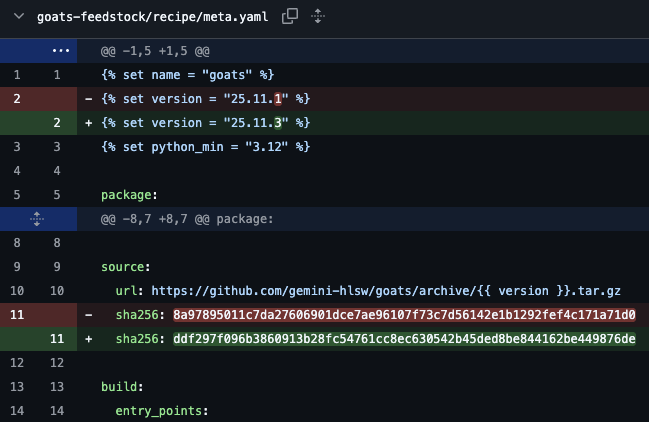
Fig. 15 Diff of
meta.yamlshowing the version and SHA256 updates for25.11.3. No changes to dependencies were needed.¶Committed and pushed the update:
git add goats-feedstock/recipe/meta.yaml
git commit -m "Update version to 25.11.3."
git push origin main
Updated gpp-client on conda-forge:
The GOATS 25.11.3 release depends on an updated version of
gpp-client.PR submitted to conda-forge feedstock:
This PR:
Updated the version of
gpp-clientto match GOATS needs.Bumped dependencies:
typerandwebsockets.Verified SHA256 and build via conda-forge CI.
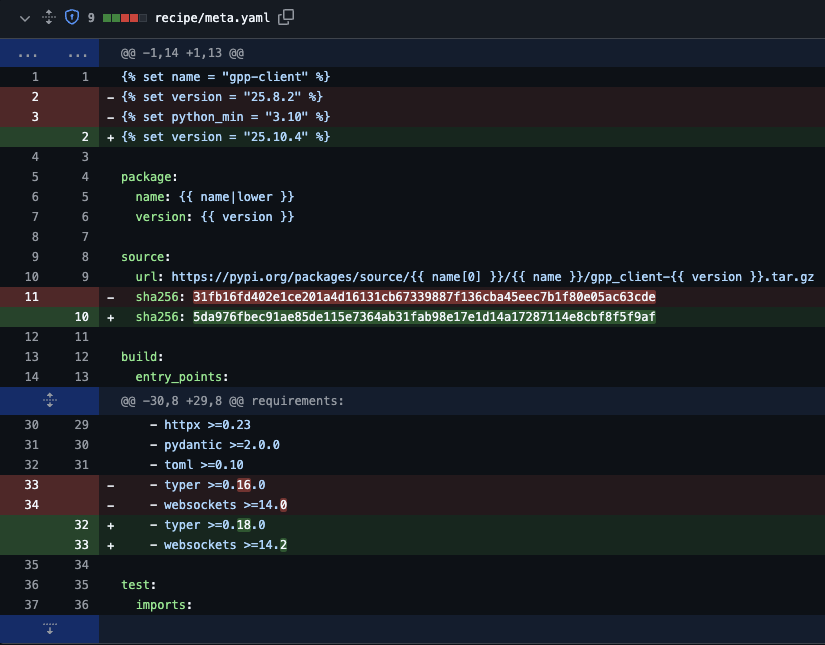
The bot auto-generated the version and checksum.
After CI passed, the PR was approved and merged.
The new package was published to conda-forge.
Updated ``tomtoolkit`` on conda-forge:
The GOATS 25.11.3 release depends on
tomtoolkit==2.26.2.PR submitted to conda-forge feedstock:
This PR:
Updated the version of
tomtoolkitto2.26.2.Verified SHA256 and build via conda-forge CI.
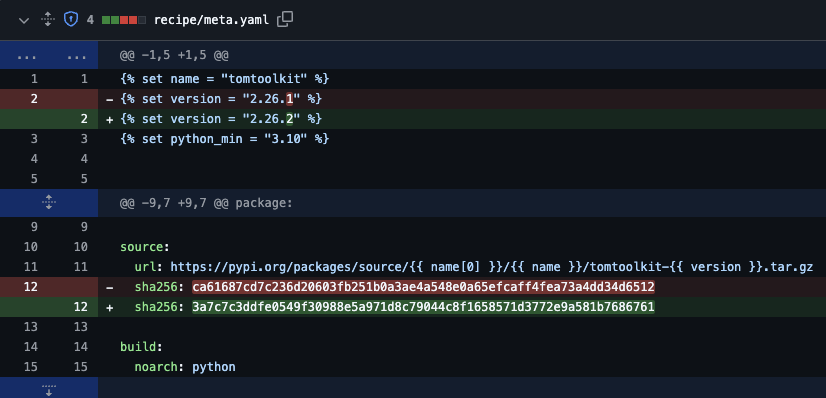
The bot auto-generated the version and checksum.
After CI passed, the PR was approved and merged.
The new package was published to conda-forge.
Ran the Conda Build workflow:
Returned to
goats-infraGitHub → Actions → Conda BuildClicked Run Workflow
Waited ~15 minutes for the build to complete
Merged the publish PR:
GitHub automatically opened a PR titled
Publish goats-25.11.3 to Conda.Reviewed the PR and confirmed the correct version and packages
Merged the PR into
main, which triggered GitHub Pages to deploy the updated Conda channel
Verified package installation and functionality:
Created a clean test environment:
conda create -n goats-25.11.3 goats
conda activate goats-25.11.3
Verified the installation with:
goats --help